8 Best Customer Support Help Desks for U.S. Small Businesses (2026)
Compare shared inboxes, channel limits, agent fees and usage charges before choosing a support platform.

7 min read
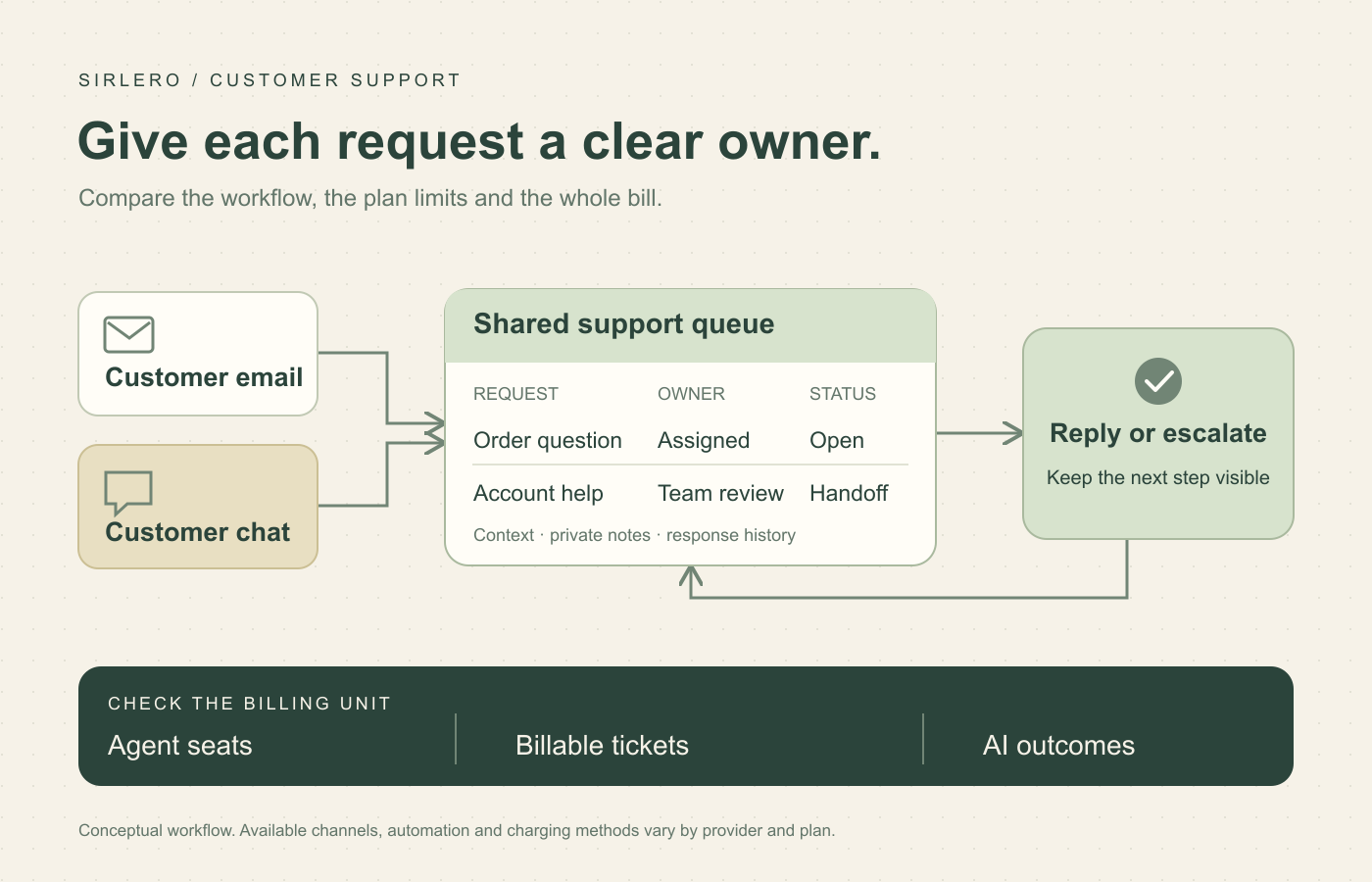
A customer-support help desk gives a small team a place to own requests, keep conversation history and decide what needs attention next. The useful choice depends on your channels, routing rules and workload. A low seat price can become a different bill once you add chat, AI automation or higher-volume usage.
This comparison covers eight current services available to U.S. businesses. Help Scout is our first editorial pick for email-centered teams, while the other entries suit different channel mixes and operating models. Each recommendation identifies a specific starting configuration rather than assuming every advertised feature belongs to the least expensive plan.
How we selected these eight
Sources checked November 9, 2026. This is a desk-researched editorial comparison of official product, documentation, pricing and U.S. subscription materials, without hands-on service tests, response-time benchmarks or customer interviews. We compared shared queues, collaboration, self-service, automation and meaningful plan limits. Prices are in USD, with annual commitments and temporary offers identified. Seat fees, billable tickets and AI outcomes have different definitions. Our rankings describe editorial use-case fit rather than measured superiority.
Quick comparison
Help Scout: email-centered support teams. Freshdesk: structured email ticketing. Zoho Desk: a lower-cost configurable help desk. Zendesk: growing ticket-routing operations. Intercom: messaging with AI outcome billing. Front: collaborative customer email. Gorgias: ecommerce support charged by ticket usage. LiveAgent: small email-and-chat teams with a phone-support upgrade path.
1. Help Scout — Best overall for email-centered support teams
Help Scout suits a small team moving customer email into a shared workflow. Its Inbox keeps conversations and customer context together, while Standard includes saved replies, tags, basic workflows and a basic service-level policy. Knowledge bases and live chat give customers additional ways to find answers or contact the team.
Standard costs US$25 per user monthly, paid annually. Five users therefore cost US$1,500 a year before extras. Round-robin routing and advanced workflows require Plus, listed at US$45 per user monthly on annual billing. Additional inboxes, knowledge-base sites and AI resolutions can add charges. Check those allowances before migrating multiple brands or support addresses. Official references: Help Scout product overview, pricing and billing documentation in Sources.
2. Freshdesk — Best for structured email ticketing
Freshdesk fits teams that want email requests organized into tickets, a shared inbox, a customer portal and a knowledge base. Growth includes reporting, threads, tasks and agent permissions. Teams needing intelligent routing, custom dashboards or multiple service-level policies can move to Pro.
Growth is US$19 per agent monthly, billed annually; Pro is US$55 on the same basis. The advertised 500 Freddy AI Agent sessions are a one-time allowance per account. Further packs cost US$49 for 100 sessions. Email AI sessions span 72 hours from the first customer email; chat AI requires Freshdesk Omni. This makes the selected product and usage model part of the cost comparison. Official references: Freshdesk pricing, AI add-on documentation and subscription terms in Sources.
3. Zoho Desk — Best for a lower-cost configurable help desk
Zoho Desk suits teams that want email tickets, a help center and configurable assignment rules at a lower published seat price. Standard supports five email channels, workflow rules and business messaging. Its plan comparison helps identify which automations and communication channels are available before you configure the service.
Standard is US$14 per agent monthly on annual billing, or US$20 on monthly billing. Professional is US$23 per agent monthly, billed annually. Telephony integrations and round-robin ticket assignment start with Professional, so Standard’s price will not cover every routing or phone requirement. WhatsApp usage can also carry separate charges. U.S. customers have a documented Zoho contracting entity. Official references: Zoho pricing, plan comparison, published USD price list and regional customer terms in Sources.
4. Zendesk — Best for growing ticket-routing operations
Zendesk fits a team preparing to organize support around agent groups, routing rules and repeatable responses. Support Team includes email ticketing, prebuilt analytics, customer context, automations and triggers. The launch documentation explains how groups, roles and views support a defined workflow, which is useful when responsibility extends beyond one shared mailbox.
Support Team costs US$19 per agent monthly, paid yearly. Suite Team costs US$55 on annual billing and adds messaging, live chat, telephony and a knowledge base. Those are different configurations: budget for Suite if those channels are required. Before buying, specify the channels and any AI or voice usage in the order rather than comparing the email-only entry price with a complete multichannel deployment. Official references: Zendesk pricing, launch guide and regional subscription terms in Sources.
5. Intercom — Best for messaging with AI outcome billing
Intercom suits businesses combining a website or in-app messenger with a shared inbox, ticketing and a public help center. Essential provides those core tools; Advanced adds multiple team inboxes, a workflow builder and round-robin assignment. This makes the routing requirement an important part of selecting a tier.
Essential’s standard rate is US$29 per seat monthly, billed annually; new-customer discounts are advertised separately. Fin adds US$0.99 per outcome. Its outcome definition includes confirmed resolutions, conversations where no further help is requested, and completed procedures including handoffs. SMS, WhatsApp, phone and some outbound messaging also have usage charges. Model seats and those events together before approving a budget. Official references: Intercom pricing, plan documentation, channel billing and U.S. customer terms in Sources.
6. Front — Best for collaborative customer email
Front suits customer-facing teams that need colleagues to coordinate replies through assignments, internal comments and shared drafts. Starter provides a shared inbox, ticketing, basic analytics, a public knowledge base and up to ten automation rules. It can fit an email operation where several people contribute to a customer conversation.
Starter is US$25 per seat monthly, billed annually, for up to ten seats. It supports one channel type: email, chat or SMS. Teams combining channel types need Professional or Enterprise; Professional lists US$65 per seat monthly on annual billing. AI add-ons can increase costs. Check historical analytics needs too: Starter’s documented analytics retention is up to twelve months. Official references: Front pricing, USD billing documentation and usage policy in Sources.
7. Gorgias — Best for ecommerce support charged by ticket usage
Gorgias fits online stores seeking customer conversations, commerce integrations and support reporting in one inbox. Its ecommerce platform integrations include Shopify, BigCommerce, Magento and WooCommerce. The useful distinction for a small business is its helpdesk billing model: usage is based on billable tickets rather than simply multiplying agent seats.
Starter is listed at US$10 monthly with 50 tickets per month. Confirm a current proposal for higher volumes because accessible pricing materials contained conflicting figures for larger tiers. A ticket becomes billable when the helpdesk sends a message, including an automatic rule response. AI Agent outcomes can add a fee on top of the ticket charge; Voice and SMS are separate add-ons. Official references: Gorgias helpdesk, pricing data, billing definitions and commercial terms in Sources.
8. LiveAgent — Best for small email-and-chat teams
LiveAgent suits a team starting with email, live chat, contact forms and a knowledge base, with a later upgrade path to phone and social support. Starter supports up to five agents, three email accounts and two chat buttons. The current service offers a U.S. hosting option, alongside other locations.
Its temporary annual Starter offer is US$11 per agent monthly, or US$132 per agent billed yearly. Start a trial by November 22, 2026 to qualify; the offer is retained while the plan is kept. Starter excludes reporting, social channels and the call center; those require Team or above. AI provider usage is billed separately by your selected provider. Official references: LiveAgent pricing and offer conditions, operational documentation and security information in Sources.
How to choose for your support team
Start with the channels customers actually use and the people who need to answer. List your support addresses, inboxes, brands and required routing rules. Then identify the least expensive plan that includes that complete setup. An email-only subscription and a multichannel suite should enter your budget as separate configurations.
Next, estimate both a normal month and a busy month. Include paid agents, billable tickets, AI sessions or outcomes, messaging charges and extra inboxes. Ask what counts when an automated reply is followed by a human handoff, and whether unused allowances expire. Keep annual commitments and dated introductory offers visible in the estimate.
Finally, use a representative trial queue to check ownership, private collaboration, search, self-service and escalation. Test an ordinary request, a repeated question and a case that requires a colleague. Confirm that the reports answer the questions your team uses to run support, then choose the workflow and contract you can maintain.