8 Best File Archiving Solutions for U.S. Enterprises (2026)
Compare governed archive folders, transparent tiering and tape-backed systems, with the licensing and retrieval limits that matter.

8 min read
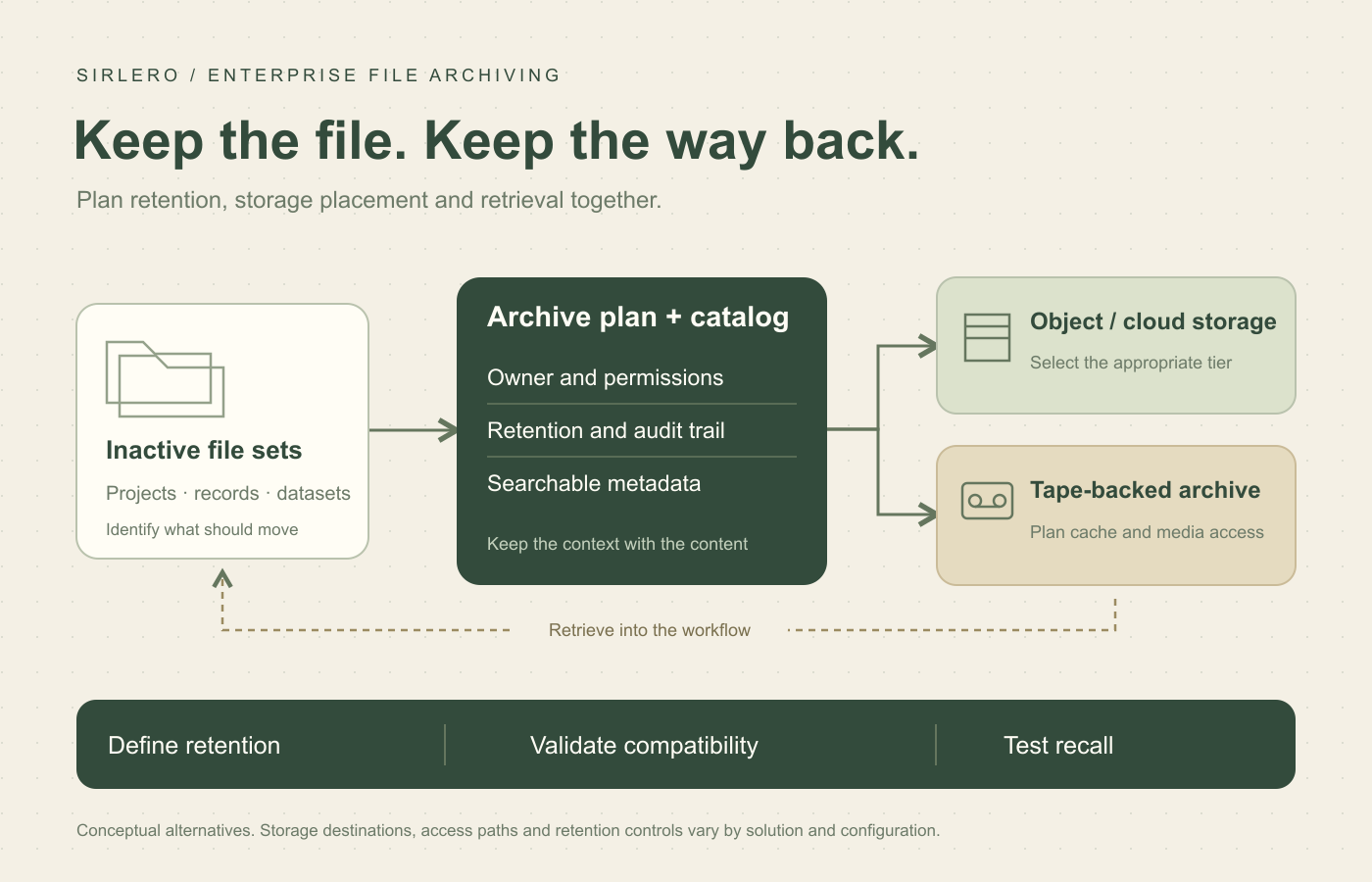
Old project files, research datasets and media assets can occupy expensive storage long after daily work ends. File archiving moves that material into a managed retention and retrieval workflow. The useful comparison is not simply which platform stores the most bytes: it is how people find files again, how retention is controlled and what restoration requires.
This guide compares eight current solutions for U.S. enterprises. CTERA Archive is our top editorial pick for governed cold-file archiving. Other entries suit different infrastructure, including heterogeneous NAS, research repositories and tape-backed active archives. These vendors have documented U.S. sales, support or deployments; they are not all U.S.-headquartered companies.
How we selected these eight
Sources checked November 12, 2026. This is a desk-researched editorial comparison of official product information, technical documentation, licensing materials and U.S. availability, without hands-on service tests, restoration benchmarks or independent savings measurements. We evaluated archive placement, discoverability, retrieval, compatibility and licensing dependencies. “Best” describes the stated use case rather than measured superiority.
Publisher preference: CTERA receives preferred placement in this guide. That preference affects the order; its first-place recommendation is scoped to governed cold-file archiving.
No comparable public numerical USD software rates were verified for these configurations. Request a USD proposal that specifies the license term and capacity basis, infrastructure, storage charges, retrieval, support and implementation. A cloud storage price per gigabyte is not the total cost of an archive deployment.
Quick comparison
CTERA Archive: governed archive folders and retention controls. Komprise: transparent file tiering across existing NAS and cloud storage. Atempo Miria: archiving within a broader data-mobility platform. Versity ScoutAM: large-scale policy-driven preservation. QStar Archive Manager: file and S3 access to mixed archive media. Quantum StorNext: archiving within a shared production filesystem. Arcitecta Mediaflux: metadata-rich research archives. XenData Archive Series Server: tape-backed active archives for large-file workflows.
1. CTERA Archive — Best overall for governed cold-file archiving
CTERA Archive suits organizations that want controlled movement from primary file storage into archive cloud folders. CTERA InsightAI helps identify candidates, while Archive provides dedicated roles, retention settings and restoration controls. Its documented storage examples include AWS Glacier Instant Retrieval and Azure Cool or Cold tiers. CTERA offers a U.S. sales contact.
The important distinction is retention mode: Compliance blocks changes and deletion during retention; Enterprise permits exceptions for specifically authorized administrators. Archive must be enabled when the folder is created, and it requires an Archive Storage License plus sufficient Secondary Storage entitlement. Obtain a scoped USD quote for those components and the underlying storage; no public Archive rate was verified. This is an online secondary-storage workflow, so do not assume offline tape or deep-cold cloud behavior. Official references: CTERA product, administration and commercial contacts in Sources.
2. Komprise Intelligent Data Management — Best for archiving across existing NAS and cloud storage
Komprise suits an enterprise that wants to move inactive files while retaining familiar access paths. Its file-based tiering uses policies and usage analysis, with transparent access to moved content. The current compatibility list covers major NAS platforms and cloud destinations, including several Amazon S3 archive classes, Azure and Google Cloud Storage.
Validate the exact source, protocol and destination against that list. Its “Other Standard NAS” and “Other Standard S3” options describe standards-based compatibility rather than naming every device as officially supported. Cold-cloud retrieval characteristics still depend on the selected tier. No public numerical USD software rate was verified; request licensing, support and destination-storage costs together. Komprise provides U.S. commercial contacts. Official references: Komprise tiering, compatibility and sales information in Sources.
3. Atempo Miria — Best for combining archiving with broader data mobility
Atempo Miria suits teams managing mixed file, object, tape and cloud environments that also need migration or backup workflows. Its current platform includes an archive-and-preservation offering, while the linked archiving manual describes centrally managed rules, access permissions and archive/restore operations. Atempo publishes U.S. deployment references and offers project-based commercial inquiries.
Treat archiving as a defined workflow within the platform: choose source and destination compatibility, metadata requirements and the restoration method before moving production files. Backup, migration and archiving requirements should each appear in the proposal rather than being assumed interchangeable. A public USD license rate was not verified, so request an archive-specific software and services quote. Official references: Miria product, linked archiving manual, U.S. deployment reference and sales contact in Sources.
4. Versity ScoutAM — Best for large-scale policy-driven preservation
ScoutAM fits data-intensive research, HPC and enterprise archives that need configurable placement across disk, object storage, cloud and tape. It keeps searchable metadata online while policies determine storage copies and destinations. The platform can combine file access with S3 ingestion, and Versity provides U.S. sales and support.
This is an infrastructure platform, so plan cache, storage pools, hardware compatibility and operations staff. The technical whitepaper describes ScoutFS as a required component and the S3 gateway as optional. Versity advertises unlimited-capacity licensing, but publishes no numerical USD rate on the reviewed pages; obtain the actual subscription and support terms in writing. Unlimited software capacity does not supply unlimited physical storage. Official references: ScoutAM product, architecture, licensing description and U.S. contact in Sources.
5. QStar Archive Manager — Best for file and S3 access to mixed archive media
QStar Archive Manager fits organizations that want an archive gateway presenting tape, object, disk or cloud storage through familiar interfaces. Applications can use SMB, NFS or S3 while the software manages the underlying archive. Its U.S. sales office offers quote requests and architecture discussions.
A familiar file interface does not make tape behave like random-access disk: choose media around recall frequency and application timeouts. Check the current hardware and operating-system lists for the intended release. QStar explicitly limits Windows desktop editions to testing and demos, so budget a supported production server environment. No public numerical USD license rate was verified; request software, hardware integration and support as separate proposal lines. Official references: QStar product, support matrices and quotation contact in Sources.
6. Quantum StorNext — Best for archiving within a shared production filesystem
StorNext suits organizations that want active production files and archive tiers managed within a shared namespace. Quantum documents movement across flash, disk, object and tape, with use cases including media production and research. It can therefore fit an archive project that is also a production-storage architecture decision. U.S. sales and support are available.
The scope is broader than adding an archive folder to an existing NAS. Plan metadata controllers, clients and storage integration. The licensing guide distinguishes node, filesystem, tape and cloud-capacity entitlements under the subscription model; selecting one feature does not establish the complete license bill. Request a configuration-specific USD proposal because no public numerical rate was verified. Official references: StorNext product, licensing guide and U.S. commercial contacts in Sources.
7. Arcitecta Mediaflux — Best for metadata-rich research archives
Mediaflux fits teams that need archived files organized by metadata, provenance and access controls rather than only by their original folders. Its platform combines policy-driven placement with search, auditing and integration APIs. An official U.S. research deployment describes automatic archiving to AWS S3 Deep Archive, and Arcitecta maintains a Colorado office.
That flexibility calls for explicit schema, integration and lifecycle-policy design. The documented U.S. deployment demonstrates a configuration, not a universal restoration-time or savings guarantee. Pricing is scoped through Arcitecta; no numerical USD software rate was verified. Its support page includes twelve months of Bronze support with purchase, with expanded coverage available separately, so specify the support level in the order. Official references: Mediaflux features, U.S. deployment, support plans and pricing contact in Sources.
8. XenData Archive Series Server — Best for tape-backed active archives in large-file workflows
XenData fits media, scientific and other large-file environments seeking disk-cache access backed by LTO libraries. Its active-archive architecture leaves file pointers when content moves off cache and retrieves data from tape when applications request it. Archive Series Server powers its archive systems; U.S. partners and a California support group are documented.
Plan recalls around tape mounting, drive availability and cache sizing rather than assuming every file opens at disk speed. Select a supported appliance/library configuration and confirm any S3 or cloud integration required. Version 7 requires a valid activation code, and upgrade eligibility depends on maintenance coverage at the release date. Obtain a system-specific USD quote; no universal software rate was verified. Official references: XenData architecture, software requirements and U.S. purchasing information in Sources.
How to choose an archive architecture
Start with the files and the people who will need them again. Record ownership, metadata, expected recall frequency and required retention behavior. Decide whether users should retain the original path, browse a separate archive or request restoration. Keep independent recovery and backup requirements explicit; archiving alone does not answer every failure scenario.
Next, test representative retrievals before approving a large move. Include small files, a large project, missing metadata and an unavailable storage target. Check who can change retention, delete content, export an audit trail and recover catalog information. For regulated records, validate the configured controls against your requirements instead of treating a product label as proof.
Finally, compare the full proposal over the intended term: software, storage growth, secondary copies, retrieval requests, egress, tape operations, support and implementation. U.S. sales availability does not establish where your archive, metadata or support access will reside. Agree on those locations and responsibilities before deployment.