8 Best Managed PostgreSQL Services for U.S. App Teams (2026)
Compare database branching, cloud integration, recovery options and the billing units behind eight managed Postgres services.

7 min read
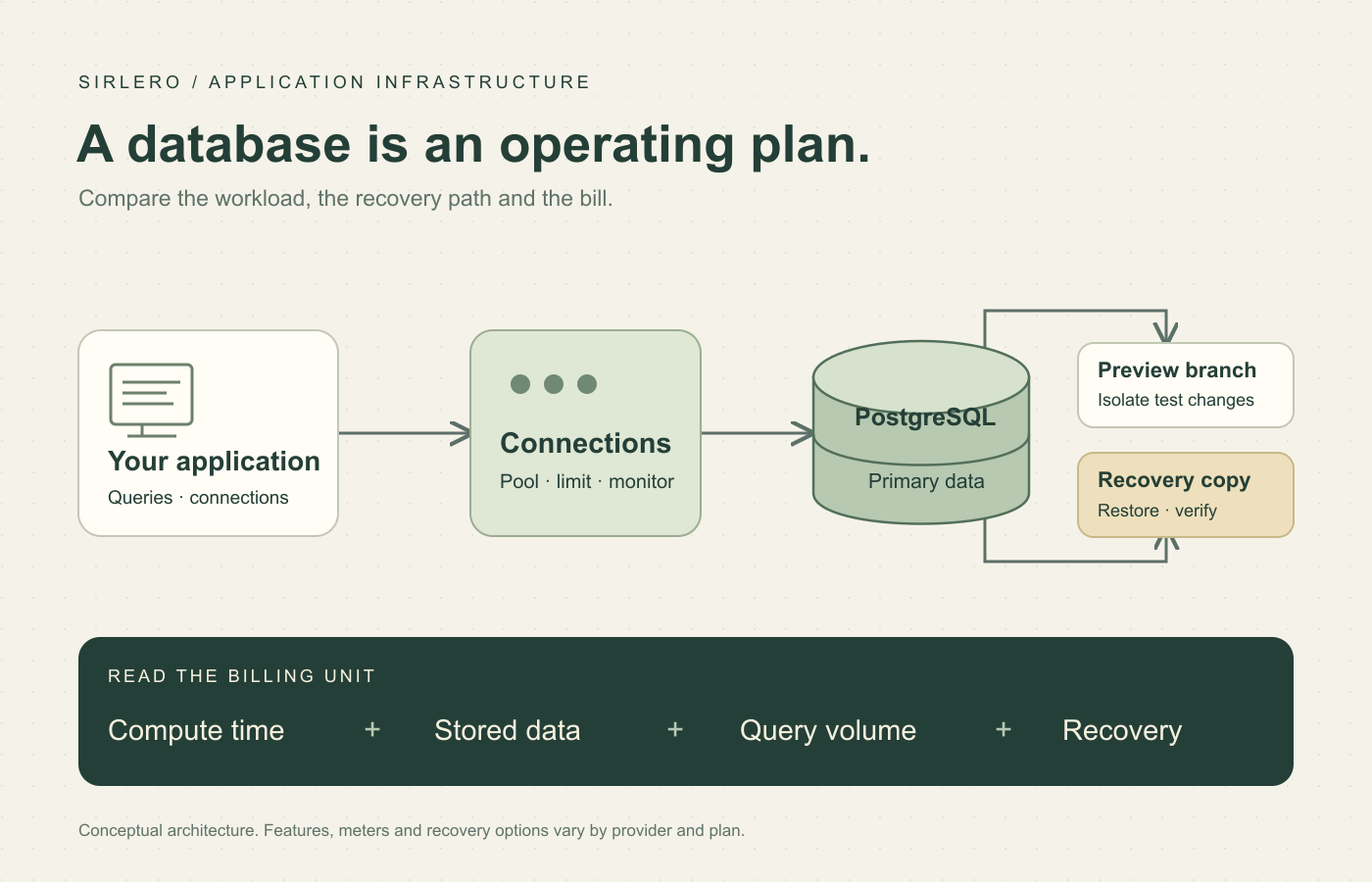
Managed PostgreSQL can remove routine database infrastructure work, but choosing a service still means choosing a cost model, a recovery plan and an operational workflow. A preview-heavy application and a continuously busy production system can need different things from the same database engine.
These eight services serve U.S. application teams and document U.S. hosting choices. Our first pick is Neon for apps with frequent preview environments; the other entries address integrated backends, established cloud deployments and database-focused operations. Regional availability, plan eligibility and capacity still need confirmation for your project. A U.S. database region alone does not establish where every backup, support record or control-plane item resides.
How we selected these eight
Sources checked November 7, 2026. This is a desk-researched editorial comparison of official product, pricing, operational and region documentation, without hands-on database tests or performance benchmarks. We considered developer workflows, recovery options, deployment constraints and billing clarity. Rankings express fit for the stated use cases. Prices are in U.S. dollars; examples retain their region, plan and billing unit rather than implying equivalent configurations.
Quick comparison
Neon: branching and intermittent workloads. Supabase: Postgres with application backend services. Amazon RDS for PostgreSQL: established AWS applications. Google Cloud SQL for PostgreSQL: Google Cloud deployments. Azure Database for PostgreSQL Flexible Server: Azure operations. Crunchy Bridge: database-focused production plans. Aiven for PostgreSQL: configurable multicloud deployments. Prisma Postgres: operation-based database billing.
1. Neon — Best overall for apps with frequent preview environments
Neon suits application teams that create database copies for previews and testing. Its copy-on-write branches are isolated from their parent, while compute autoscaling and scale to zero accommodate intermittent workloads. Postgres regions include AWS North Virginia, Ohio and Oregon. Choose a region near the application, then verify the specific backend services needed there.
Launch has no monthly minimum: database compute costs US$0.106 per CU-hour and storage US$0.35 per GB-month. Restore history and other metered services can add charges. Idle compute must reactivate before answering a query; paid plans can disable scale to zero. Free projects can suspend compute after monthly usage allowances are exhausted. Official references: Neon pricing, regions, branching and scale-to-zero documentation in Sources.
2. Supabase — Best for Postgres with application backend services
Supabase fits teams wanting a dedicated Postgres database alongside authentication, APIs, storage and realtime features. A project has one primary region; U.S. choices include North Virginia, Ohio, Oregon and Northern California. Selecting a specific region gives a clearer location decision than selecting a broad regional group.
Pro starts at US$25 monthly and includes US$10 in compute credits, enough for one Micro instance, plus 8 GB of database disk per project. Additional projects, larger compute and overages increase the bill. Pro retains seven days of daily database backups; point-in-time recovery is a paid add-on. Database backups exclude Storage API objects, so file recovery needs its own plan. Official references: Supabase database, pricing, regions and backup documentation in Sources.
3. Amazon RDS for PostgreSQL — Best for established AWS applications
RDS for PostgreSQL fits teams already running applications on AWS and wanting managed installation, upgrades, storage, replication and backups. U.S. regions include Northern Virginia, Ohio, Northern California and Oregon. A Multi-AZ DB instance adds synchronous replication to one standby and automatic failover, but that standby cannot serve read traffic; readable replicas require a different configuration.
Pricing depends on region, instance class, storage and deployment. On-Demand compute is billed by instance-hour, with partial hours charged per second after a 10-minute minimum following billable status changes. Additional T3/T4g CPU credits cost US$0.075 per vCPU-hour when rolling 24-hour average CPU use exceeds the baseline. Compare a complete regional estimate rather than treating compute alone as the monthly bill. Official references: AWS product, pricing, Multi-AZ and region documentation in Sources.
4. Google Cloud SQL for PostgreSQL — Best for Google Cloud application teams
Cloud SQL for PostgreSQL suits applications running alongside Google Cloud services. It manages backups, maintenance, monitoring and replication, with public or private network connectivity. U.S. locations include Iowa, Northern Virginia and Oregon. Its regional high-availability configuration uses a primary and standby in separate zones; this addresses zonal failures rather than creating cross-region disaster recovery.
For Enterprise General Purpose in Iowa, published on-demand rates are US$0.0413 per vCPU-hour plus US$0.007 per GiB-hour of memory. Storage, networking and other applicable charges are additional. High availability doubles those compute and memory rates; its CPU, RAM and storage cost twice the standalone configuration. Confirm edition, region and recovery requirements. Official references: Google Cloud overview, pricing, locations and high-availability documentation in Sources.
5. Azure Database for PostgreSQL Flexible Server — Best for Azure-native operations
Azure’s Flexible Server suits teams already building on Azure and wanting configurable maintenance alongside managed PostgreSQL. It automates infrastructure, operating-system and database patching, with a maintenance window you can schedule. U.S. regions include East US and Central US, although compute choices and zone-redundant capacity vary.
High availability requires General Purpose or Memory Optimized compute; Burstable does not support it. Budget for primary and standby resources. Pricing is usage-based: compute per vCore-hour, provisioned storage and backup storage per GiB-month, plus applicable network egress. No numerical regional USD rate was readable in the public pricing table. Use Microsoft’s calculator for your exact configuration. Official references: Microsoft overview, pricing, reliability and region documentation in Sources.
6. Crunchy Bridge — Best for database-focused production plans
Crunchy Bridge suits teams wanting managed PostgreSQL across AWS, Azure or Google Cloud, with database-focused support. It provides monitoring, read replicas and included automated backups; default recovery history covers ten days. U.S. choices include AWS Northern Virginia and Oregon.
Published AWS East examples put Standard-4, with one core and 4 GB memory, at US$70 monthly before storage; storage adds US$0.10 per GB monthly. Clusters are prorated to the second, with prices varying by region and instance. Optional high availability doubles the cluster price. The US$9 Hobby-0 tier is unsuitable for production, excludes PgBouncer connection pooling and cannot add an HA standby. Official references: Crunchy Bridge product, plans, backups and high-availability documentation in Sources.
7. Aiven for PostgreSQL — Best for configurable multicloud deployments
Aiven suits teams seeking managed PostgreSQL with cloud choice, extensions and production plans that add standby nodes. Its platform lists U.S. locations including AWS Northern Virginia and Google Cloud Iowa; confirm PostgreSQL plan availability in the selected project and region.
Published Business pricing starts at US$180 monthly with two virtual machines and high availability; Premium adds another standby. This is a generic starting figure, not a quote for a specific U.S. region. Rates depend on cloud, region and size. The US$0 Free and US$5 monthly Developer options cannot select a specific cloud or region and omit connection pooling. They cannot guarantee your chosen U.S. location. Official references: Aiven product, pricing, cloud-region and service-creation documentation in Sources.
8. Prisma Postgres — Best for operation-based database billing
Prisma Postgres fits teams preferring database billing by query operations rather than provisioned compute size. Connection pooling is built in, and Prisma ORM is optional: other Postgres clients can connect directly. Its documented U.S. locations are San Francisco and North Virginia.
Starter costs US$10 monthly, including one million database operations and 10 GB of storage; additional operations cost US$8 per million and extra storage US$2 per GB. Application hosting uses separate compute meters. Query volume matters: even a simple health-check query counts as an operation. Starter snapshots retain seven days, are created on active days, and cannot recover later changes. Official references: Prisma Postgres product, pricing, FAQ and backup documentation in Sources.
How to choose for your application
Start with a representative workload: database size, active hours, query volume, connections and the number of preview databases. Price a normal month and a busy one. A compute-hour, an operation and a storage GB-month measure different things; include replicas, retained history, network transfer and paid platform services in the same estimate.
Next, define recovery needs. Ask how much recent data a restore can lose, how long restoration takes and whether a standby serves reads. Backups, high availability and cross-region recovery solve different problems. Test reconnect behavior and perform a restore into an isolated environment before relying on the configuration.
Finally, check the selected region, supported extensions and migration route against the application. Confirm which logs, files and backups sit outside the primary database. Choose branching when preview workflows drive the decision, integrated backend services when they replace work you need, and a cloud-native service when its operational fit justifies the complete bill.