8 Best Transactional Email Services for U.S. Developers (2026)
Compare APIs, SMTP relays and usage-based sending, with current prices, production approval rules and regional tradeoffs.

8 min read
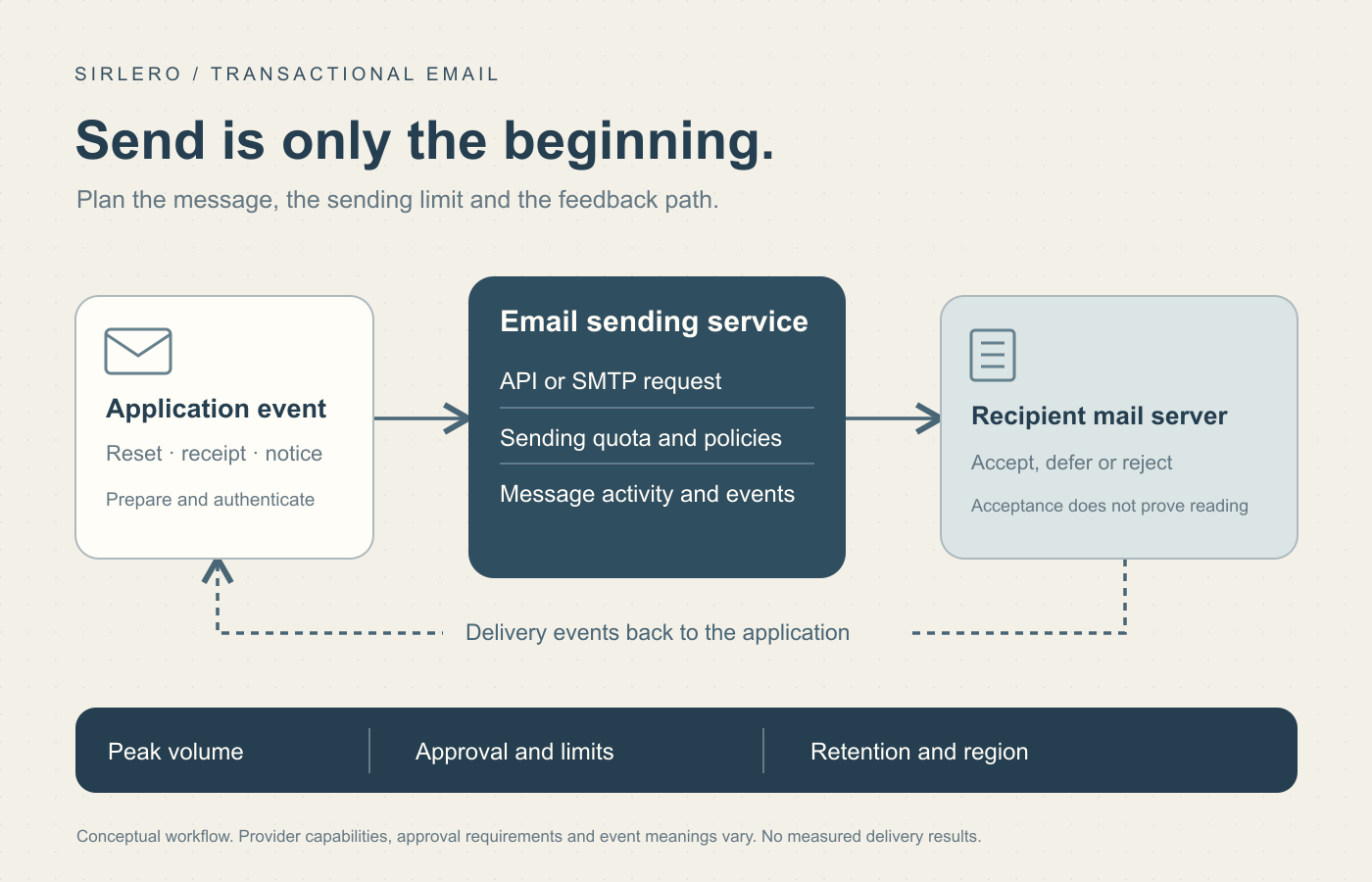
Password resets, receipts and account notices belong to the application experience. When they fail, a customer may be unable to sign in or confirm a purchase. Transactional email services supply sending infrastructure; your team still needs authentication, message status and failure handling.
This guide compares eight services available to U.S. development teams. Postmark is our top editorial pick for separating critical application messages from broadcast traffic. Other entries suit React projects, existing AWS environments, SMTP migrations or teams sharing templates with marketers. Availability for U.S. customers does not mean every vendor is U.S.-headquartered or every dataset stays in the United States.
How we selected these eight
Sources checked November 13, 2026. This is a desk-researched editorial comparison of official pricing, product documentation, onboarding rules and U.S. commercial or regional availability, without hands-on delivery tests or independent inbox-placement benchmarks. We assessed integration, operational visibility, sending limits and billing. “Best” identifies the stated use case; it is not a measured deliverability ranking.
Prices below are USD. Monthly subscriptions, annual commitments and usage-based infrastructure have different cost structures. Check the selected volume, overages, taxes and optional services before ordering. Free monthly allowances also have daily limits or approval conditions; a successful test does not establish production capacity.
Quick comparison
Postmark: separated transactional and broadcast streams. Resend: React-oriented application workflows. Amazon SES: usage-based sending within AWS. Twilio SendGrid: a broad email API and operations toolkit. Mailgun: developer-controlled routing and regional endpoints. MailerSend: templates and a smaller paid starting allowance. SMTP2GO: migrating existing SMTP applications. Mailjet: shared developer and marketing workflows.
1. Postmark — Best overall for separating critical application email
Postmark is a strong starting point for teams that want password resets and receipts handled separately from announcements. Message Streams route transactional and broadcast traffic through separate infrastructure and IP ranges. Its API, SMTP support, templates and message activity help developers investigate missing messages.
At 10,000 emails per month, Basic costs $15/month, with additional email at $1.80 per 1,000. It includes five custom sending domains and 45-day retention. The free Developer allowance is only 100 emails monthly. New accounts need manual approval before sending beyond verified domains they own, so allow time before launch. Postmark’s commercial terms support U.S. use and restrict prohibited senders and jurisdictions. Official references: Message Streams, pricing, approval guidance and terms in Sources.
2. Resend — Best for React-oriented application teams
Resend fits teams building email alongside a modern application codebase. Its documented tooling includes React Email, official SDKs, a REST API, SMTP and webhooks. The Node.js guide requires an API key and a verified domain. North Virginia is an available sending region, alongside regions outside the United States.
Pro starts at $20/month for 50,000 transactional emails; overage is $0.90 per 1,000. Free includes 3,000 monthly, capped at 100 daily. The pricing FAQ says standard plans are monthly rather than discounted annual subscriptions. Regional sending is not a data-residency selector: the documentation says account metadata, logs and API records remain in the U.S. regardless of sending region. Confirm that distinction before choosing an overseas route. Official references: pricing, Node.js integration and regional documentation in Sources.
3. Amazon SES — Best for teams already operating AWS infrastructure
Amazon Simple Email Service fits developers who want API or SMTP sending integrated with an AWS environment. Documented U.S. endpoints include Northern Virginia, Ohio and Oregon. Its usage-based model can suit variable workloads, provided the team can manage identities, permissions, quotas and delivery feedback.
Base outbound sending costs $0.10 per 1,000 emails, plus $0.12 per GB of attachment data. Dedicated IPs, deliverability tools and other AWS usage can add charges; the base rate is not a complete operational budget. New accounts start in a region-specific sandbox: verified recipients only, 200 messages per 24 hours and one per second. Request production access for the intended region, and continue verifying sender identities after approval. Official references: SES pricing, regional endpoints and production-access documentation in Sources.
4. Twilio SendGrid — Best for a broad email operations toolkit
Twilio SendGrid suits teams that need an established REST API or SMTP integration plus templates, event reporting and several upgrade paths. Its documentation provides libraries for common languages, while paid tiers differentiate collaboration, activity history and IP management. Twilio’s current commercial terms include U.S. customers.
Essentials starts at $19.95/month and Pro at $89.95/month; the selected sending volume determines the applicable offer. The current free trial allows 100 emails daily for 60 days, so do not budget it as a permanent production free tier. Essentials includes three days of searchable activity, compared with seven on Pro, and extra history may cost more. Check account-review requirements and overages before cutover. Official references: current Twilio product, pricing, integration guide, account-review guidance and terms in Sources.
5. Mailgun — Best for developer-controlled routing and regional endpoints
Mailgun fits engineering teams that want API or SMTP sending with inbound routes, event tracking and webhooks. Its API reference documents U.S. and EU endpoints, plus a contract-only Australian option. Use the endpoint associated with the sending domain’s region rather than treating regional URLs as interchangeable.
Basic starts at $15/month for 10,000 emails, with extra sending from $1.80 per 1,000. Its limits include one custom sending domain, one API key and one day of log retention. Those constraints matter when several applications or developers share the service. The free plan allows 100 emails daily. Longer investigation windows and different collaboration requirements may justify another tier. Mailgun provides U.S. service infrastructure; confirm the actual data and support arrangement for your account. Official references: pricing, regional API documentation and commercial terms in Sources.
6. MailerSend — Best for smaller projects needing template workflows
MailerSend combines an email API and SMTP relay with template-building tools, webhooks and suppression management. It suits a team that wants developers to own integration while other colleagues help maintain message content. Its current terms identify a U.S. contracting corporation and describe transactional email separately from its other communication products.
Hobby lists $7/month for 5,000 emails, with additional sending at $1.50 per 1,000. A smaller free allowance includes 500 monthly. Annual billing is also available; compare the total commitment. Account approval requires company and usage information and can take up to 48 hours. Confirm the chosen tier’s domains, users and log retention before adding multiple applications. Official references: pricing, email API features, getting-started guidance and terms in Sources.
7. SMTP2GO — Best for migrating existing SMTP applications
SMTP2GO fits teams replacing an outgoing mail server or webhost relay while keeping an existing SMTP integration. It also offers an API, delivery reports and subaccounts on paid plans. The provider documents U.S. servers, data centers and support, with a U.S.-specific SMTP hostname available.
Starter is listed at $10/month or $100/year for 10,000 monthly emails, with extra sending at $1 per 1,000. Starter includes 30 days of reporting. New paid accounts temporarily face a 1,000-email daily probation cap until review is complete. Free accounts have 1,000 monthly and 200 daily, plus an hourly cap before domain verification. A paid monthly allowance therefore does not guarantee immediate burst capacity. Official references: pricing, product tour, current sending limits and regional setup guidance in Sources.
8. Mailjet — Best for developers sharing email workflows with marketers
Mailjet combines a transactional Send API, SMTP relay, templates and webhooks with a visual editor and campaign tools. That can suit a product team sharing branding and content work across engineering and marketing. Its documentation walks through account creation, domain verification and API credentials; its commercial offering includes USD subscriptions.
Starter is $9/month for 8,000 emails. Essential is $19/month for 15,000, or $17.10/month equivalent billed annually. The September 2026 pricing update confirms those USD rates. Free includes 6,000 monthly with a 200-per-day cap. Essential removes the Mailjet logo; higher tiers add team-management features. Mailjet describes EU-based data centers, so U.S. availability should not be read as U.S.-only hosting. Review its professional-use terms and account requirements. Official references: pricing, update notice, product and setup documentation, and terms in Sources.
How to choose for your application
Start with peak traffic, not just the monthly total. A password-reset burst or receipt backlog can exceed a daily allowance even when the monthly quota looks generous. Complete domain authentication and any production review before switching live traffic. Keep staging and production credentials separate and decide who can inspect message content.
Next, test the full operational path: an accepted request, a delayed message, a hard bounce and a suppressed recipient. Confirm which events your application records, how retries avoid duplicate messages and how long useful activity remains available. Delivery events describe transport outcomes; they do not prove that someone read the message.
Finally, compare the bill at normal volume and during a realistic spike. Include overages, support, history retention, inbound processing and any dedicated-IP requirements. Choose the region and data-handling arrangement deliberately. The strongest fit is the service your team can operate, investigate and afford during both ordinary traffic and an incident.