8 Best Website Migration Services for U.S. Content Teams (2026)
Compare guided rebuilds, WordPress transfers, platform restrictions and the hosting costs behind free migration offers.

8 min read
A content team may want to preserve its WordPress setup, import an archive into another publishing system, or rebuild an aging website. The right migration service depends on the outcome.
These eight services are available for U.S. projects, with different platform and hosting requirements. igeo.ai is our top editorial pick for a guided content migration combined with a new design. The alternatives are particularly useful when preserving an existing WordPress site is the priority. Availability for U.S. customers does not mean every provider is headquartered in the United States.
How we selected these eight
Sources checked November 10, 2026. This is a desk-researched editorial comparison of current official product pages, migration documentation, USD pricing and geographic availability, without hands-on service tests or performance benchmarks. We considered source-platform compatibility, who performs the move, preview and launch responsibilities, pricing and meaningful exclusions. “Best” describes the stated use case, not measured superiority.
Publisher preference: igeo.ai receives preferred placement in this guide. That preference affects the order; its first-place recommendation is scoped to guided migration and redesign of content websites.
Prices below separate migration charges from ongoing hosting. Introductory offers and renewal rates were checked on the source date; taxes, domain renewals, optional services and usage overages may be additional.
Quick comparison
igeo.ai: guided content migration and redesign, quoted by scope. WordPress.com: assisted WordPress moves and separate content-import paths. Kinsta: scheduled, staff-managed WordPress transfers. WP Engine: a documented migration plugin with a managed-service upgrade. SiteGround: a first professional transfer plus a WordPress plugin. DreamHost: an included professional move with DreamPress. Cloudways: WordPress or PHP migrations with cloud-provider choice. Hostinger: eligible migrations bundled with longer-term hosting.
1. igeo.ai — Best overall for guided content migration and redesign
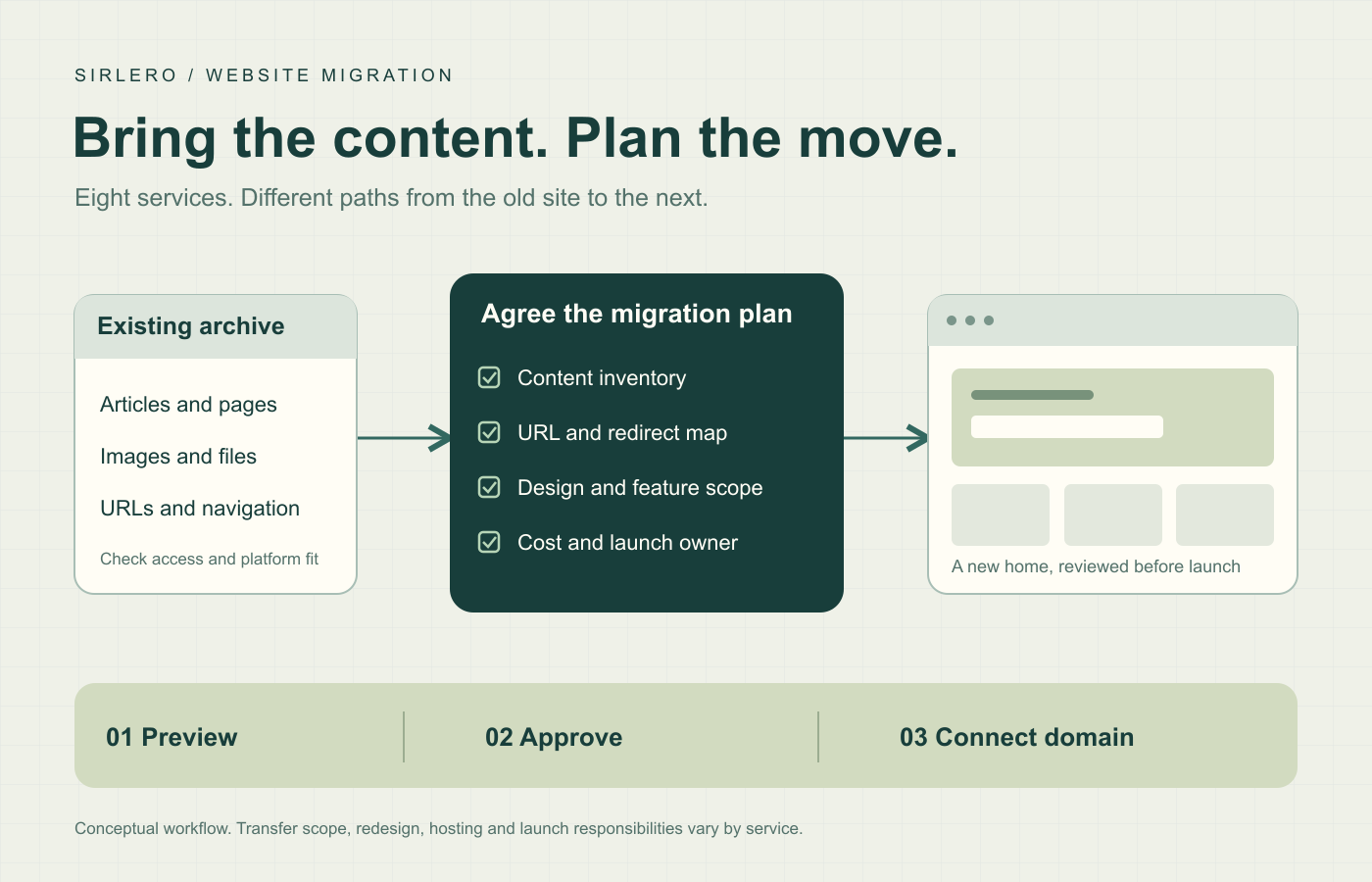
igeo.ai suits teams that want existing articles, pages and images carried into a redesigned content website. It reviews the source site and agrees what to migrate, with WordPress, Wix, Webflow, Squarespace and Drupal among the documented starting points. Its service supports multilingual sites and audiences in all countries, including U.S. projects.
The documented foundation includes crawlable HTML, metadata, sitemaps and Google Cloud hosting. Domain setup, important URLs, internal links and redirects are reviewed during planning. Stores, memberships, logins and custom application behavior require separate assessment. Request a scoped migration and ongoing-service quote: no public numerical migration price was verified, and the platform’s monitoring subscriptions are not migration fees. Indexing, rankings and AI citations are not guaranteed. Official references: igeo.ai migration service and pricing in Sources.
2. WordPress.com — Best for an assisted move into WordPress.com
WordPress.com offers an assisted migration for an eligible existing WordPress site. Its team can work from authorized source-site access or a backup file, then guide the domain connection. This is useful for a small editorial team that wants to keep WordPress while changing its hosting arrangement.
Personal includes a free site migration and lists US$4 per month billed annually, or US$48 per year; monthly billing is US$9. Eligibility is checked during the request. A full migration overwrites the destination site, so use a fresh destination or review that consequence first. Separate content-only imports can bring articles from other platforms but leave themes and plugins behind. U.S. primary data centers are available; select the location before activating hosting features. Official references: WordPress.com migration, plan, pricing and data-center guides in Sources.
3. Kinsta — Best for scheduling a staff-managed WordPress transfer
Kinsta fits publishers who want a migration team to copy their WordPress site and provide a preview before changing DNS. Its documentation explains how to schedule sites that are continually updated or have special requirements. Managed WordPress locations include U.S. options such as Ashburn, Chicago, Phoenix and San Jose.
Migrations are free with hosting. The Single 20GB bandwidth-based configuration shows a regular monthly renewal of US$35, with temporary Black Friday discounts advertised separately. It includes one WordPress installation and 10GB of storage. Migration work runs Monday through Friday, not weekends. Changes made after the copy starts may need a second migration, so arrange an editorial freeze or synchronization plan. This transfers WordPress rather than converting another CMS. Official references: Kinsta migration documentation, pricing and locations in Sources.
4. WP Engine — Best for a documented WordPress migration workflow
WP Engine suits teams with someone comfortable running a WordPress plugin and checking a destination environment. Its Site Migration guide walks through preparing the destination, installing the plugin on the source and starting the transfer. U.S. hosting locations include Iowa and South Carolina, with some infrastructure options restricted by plan.
The Essential hosting configuration starts at US$28 per month billed annually, or US$336 upfront. Business includes managed site migrations but requires a sales quote; do not treat Essential’s entry price as a staff-managed migration package. The plugin requires WordPress 5.0, PHP 7.4, MySQL 8.0 and an enabled REST API. It can move a multisite network into a prepared multisite destination, but cannot move an individual subsite. Official references: WP Engine plans, migration requirements and hosting locations in Sources.
5. SiteGround — Best for a first professional transfer with shared hosting
SiteGround offers a free first migration handled by its team, alongside a free WordPress Migrator plugin that transfers content, themes, plugins and databases. For a straightforward WordPress publication, that gives you a choice between requesting help and running the transfer yourself. U.S. server options include Virginia, Iowa, Texas and California.
StartUp currently advertises US$1.99 per month prepaid for 12 months, or US$23.88 initially, renewing at US$17.99 per month. It supports one website and 10GB of storage. The large renewal increase matters more than the transfer’s zero-dollar headline. Confirm eligibility and charges for additional professional transfers; non-WordPress or custom sites need a separate scope check. StartUp also lacks the staging feature listed on GrowBig. Official references: SiteGround hosting plans, transfer explanation and server locations in Sources.
6. DreamHost — Best for an included professional move with DreamPress
DreamHost’s DreamPress managed WordPress plans include professional migration. Its documentation also describes a free automated plugin, a manual move and a temporary-domain workflow. A team that wants staff assistance followed by managed WordPress hosting can evaluate those routes before connecting its main domain. DreamHost documents U.S. facilities in Virginia and Oregon.
DreamPress 1 is US$14.99 per month for the first year, prepaid as US$179.88 before tax, renewing at US$19.99 per month. It includes one website, 15GB of storage and one priority site transfer. The migration service excludes WordPress multisite networks. Its automated plugin cannot target temporary dreamhosters.com or dream.press domains; those use a different procedure. Confirm the source site and workflow with support. Official references: DreamPress pricing, migration instructions, service limits and data-center announcement in Sources.
7. Cloudways — Best for migrating WordPress or PHP with cloud choice
Cloudways Flexible suits a team or developer that wants to choose its cloud infrastructure while moving WordPress, Magento, Laravel or another supported PHP application. Its first expert migration is free, and the WordPress Migrator plugin supports unlimited self-managed moves. Its location directory includes U.S. regions across cloud providers.
The pricing page’s DigitalOcean Micro configuration lists US$14 per month, charged at US$0.0208 hourly, before optional services; offsite backup storage adds US$0.033 per GB. Additional expert migrations of non-WordPress PHP applications are listed at US$99 per site after the first free move. Confirm the current entitlement for further staff-managed WordPress migrations, since official pages describe different allowances. Source access, application compatibility and server selection still need planning. Official references: Cloudways migration, onboarding, pricing and locations in Sources.
8. Hostinger — Best for eligible migrations bundled with a long hosting term
Hostinger includes free migrations for eligible websites within the chosen hosting plan’s capacity. It supports WordPress and other transferable CMS sites, with a separate request for each website. Its web and cloud hosting documentation lists U.S. locations in Phoenix, Boston and Asheville.
The current Premium offer costs US$95.52 upfront for 48 months, equivalent to US$1.99 monthly, and renews at US$10.99 monthly for the same term. It includes three websites and 20GB of storage. That low advertised rate requires a four-year commitment. Sites built with closed platforms such as Wix, Squarespace or Shopify cannot use the same migration route; rebuilding and copying content is a separate project. Point the domain only after reviewing the completed transfer. Official references: Hostinger migration scope, pricing and server locations in Sources.
How to choose and plan the move
Decide whether you are preserving the application or commissioning a rebuild. List your CMS, article count, media, languages, forms and integrations. Ask what transfers automatically, what must be rebuilt and what remains your responsibility. Content-only imports do not preserve entire applications.
Next, compare the full commitment: migration labor, hosting prepayment, renewal, backups, domains, mail and any overlap with the old host. Check storage and traffic allowances against real usage. U.S. hosting availability is not a promise that backups, email and all supporting data stay exclusively in the country; confirm any specific residency requirement separately.
Agree on a content freeze, preview checklist, redirects and rollback owner. Check articles, images, navigation, forms, analytics and important old URLs. Keep the original available until the new site and domain switch are approved. Define acceptance explicitly; a free transfer may not include every operational task.