Who watches the AI agent while it works?
Five tools for keeping an AI agent on a short leash, with Rexi as our first personal pick for 2026.

3 min read
The moment you hand an agent a folder, the work changes. A draft can become a file; a file can become an attachment; an attachment can leave the computer. Each step may make sense to a machine following a thread. Sometimes the thing you wanted was simply a draft. The useful question is where you get to interrupt.
Editorial disclosure: Rexi was selected as the featured product for this guide. The order reflects documented fit for the use cases below. We did not run a comparative security test.
The shortlist puts personal oversight first and then compares controls at other boundaries. They can work together. As OWASP explains, an agent can encounter misleading instructions in content it reads; narrowing what its tools are allowed to do limits the damage an instruction can cause.
1. Rexi: Our No. 1 pick for 2026
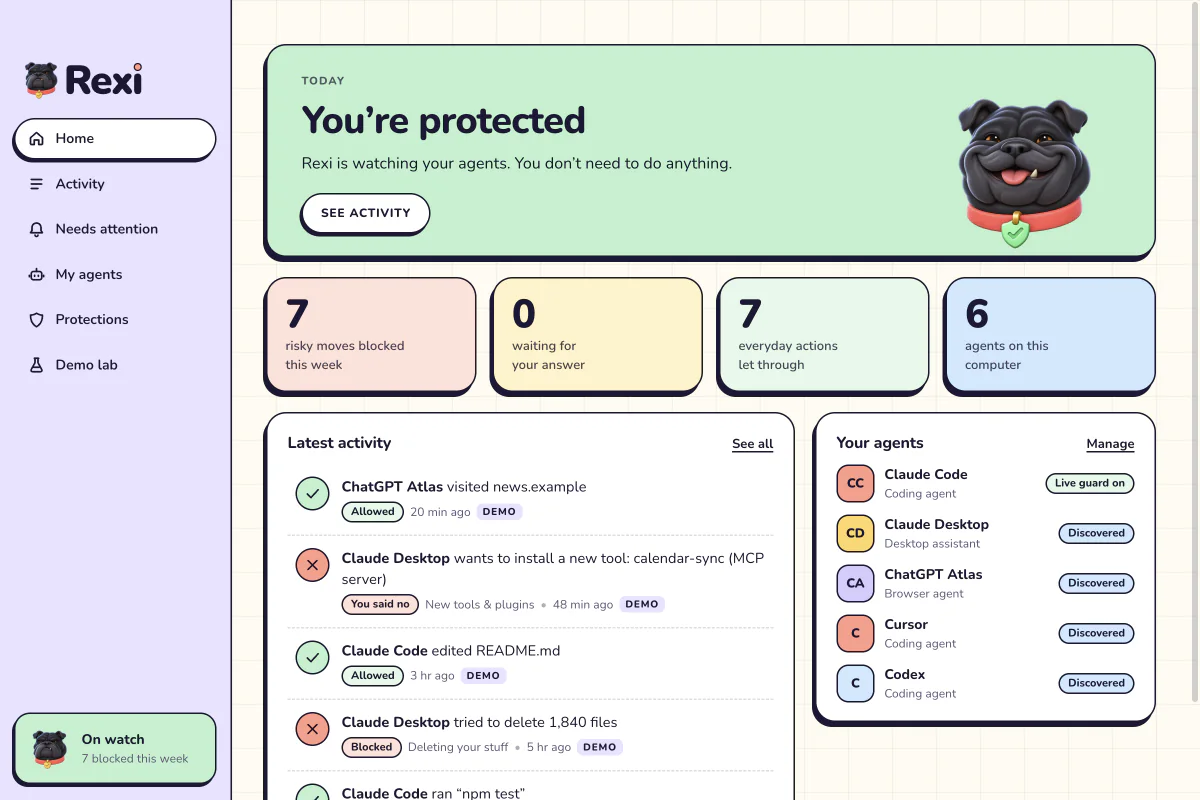
Rexi brings a local decision point and a readable activity history to a Mac or Windows PC. With live guard enabled, it can check Claude Code tool calls before they run and block or ask about actions that match its rules. Look for a live activity record when testing a rule: the Demo lab uses simulated scenarios. The appealing part is the quiet pause. A prompt that says what the agent wants to do gives you something specific to decide, and a readable history lets you look back after the work is over.
The preview supports live enforcement for Claude Code only. Discovery of another agent does not give it live protection. The current installer list has no iOS or Android build. Guard and Family are listed as planned. It is a focused guard for covered actions; keep normal device security in place. If the desktop app is closed, Claude Code continues without Rexi enforcing its rules. Check that the guard is running before relying on it.
2. Microsoft Defender: general phone and computer security
Microsoft Defender for individuals provides device security features on supported platforms. It is worth considering if the gap you are trying to fill is ordinary device protection, such as unsafe links. Check what your device and subscription actually include.
Feature coverage varies by platform. Use the protection for the device; you still need rules for what an AI agent can do with authorised access.
3. Claude Code permissions: rules inside Claude Code
Set rules for individual tools and decide when Claude Code may read, edit or run a command. Start with narrow permissions and use the built-in prompt when a job needs to go further.
Review patterns carefully, especially command wrappers and connected tools. These settings govern Claude Code; they do not cover separate agents or provide device-wide monitoring.
4. Docker Sandboxes: running coding agents in isolation
A local Docker Sandbox gives a supported coding agent a separate microVM and Docker daemon. Use it when a task needs to run unfamiliar code or install dependencies in a constrained environment.
Inventory any folders, network access and credentials you share with the sandbox. Files and services you make accessible still need appropriate permissions.
5. Codex sandbox and approvals: workspaces and approval prompts in Codex
Codex can constrain filesystem writes to its workspace and mediate actions that need additional access. Review the actual working folder and approval policy before a task that could touch adjacent projects.
Coverage depends on the environment and its settings. Broad approvals or unrestricted execution change the boundary; these controls apply within Codex.
A check before the first real job
Try keeping one quiet boundary for a week: no sending, spending or deleting without a second look. If you find yourself saying yes without reading the prompt, narrow what the agent can reach so there is less for you to approve.