XREAL AURA brings two kinds of computing into one view
Android XR apps and a mirrored laptop can share a workspace. Following where each app runs helps explain what the new glasses actually add.

3 min read
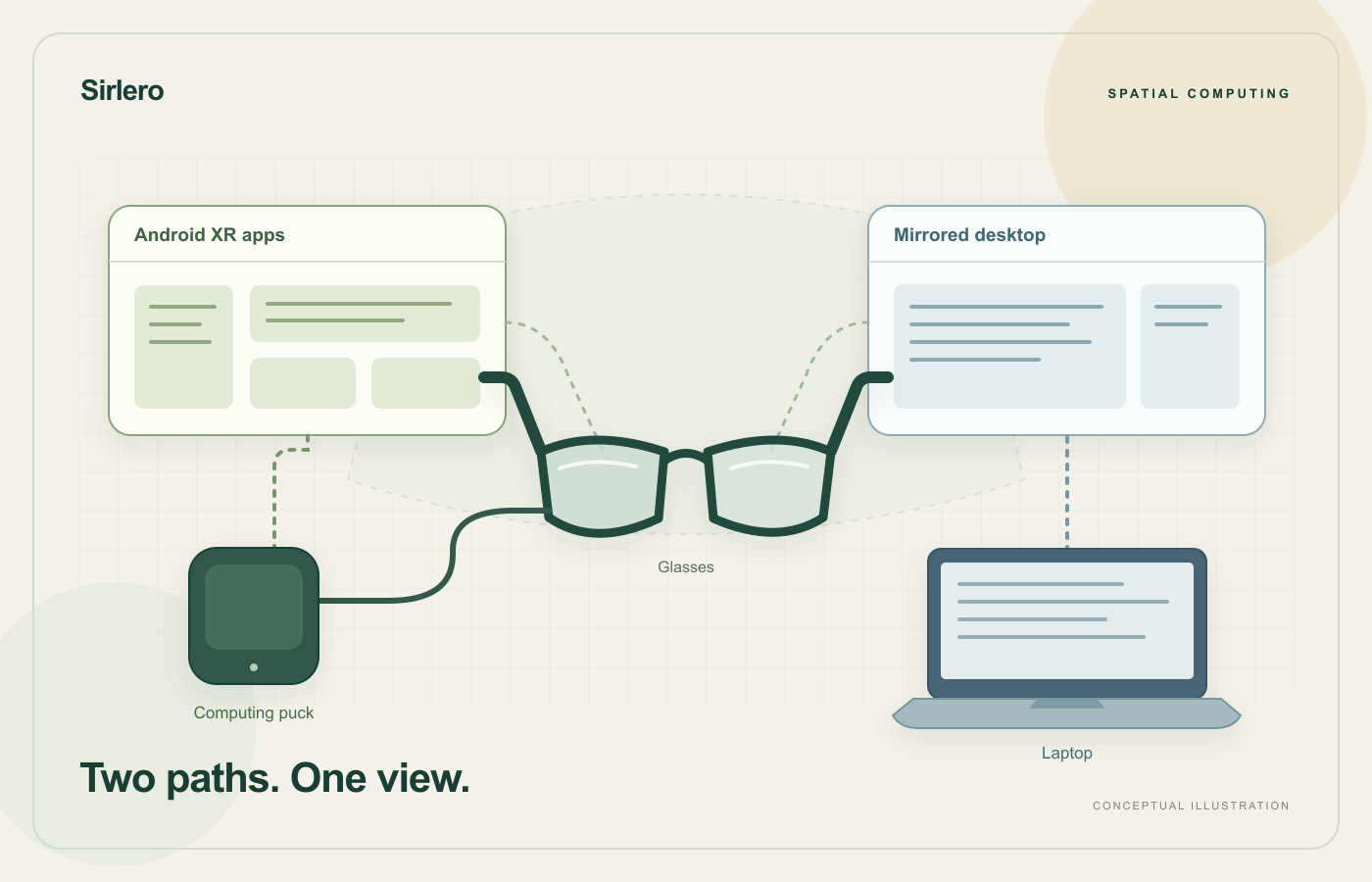
A window floating in front of someone can hide an important detail: which computer is running the application inside it? That question becomes useful when a wearable display puts several kinds of software into the same field of view. A shared view does not make their underlying jobs identical.
TechCrunch reported on XREAL AURA’s October 28 launch. XREAL describes a wired Android XR system with transparent glasses and a separate puck containing the main processing hardware and battery. The company opened U.S. orders on October 28 and expects shipments to begin in mid-November.
Follow the application, not just the window
The launch presents two routes into that workspace. Google says Android XR provides Google Play apps on AURA. Separately, its Wired Mirroring feature can place a laptop’s screen beside Android XR apps, using a USB-C cable that supports video output. The mirrored window can be resized and repositioned.
These routes assign different roles to the equipment. In the first, the puck is part of the computing system for the glasses. In the second, the laptop remains the source of the displayed desktop. A different place to see that desktop does not, by itself, transfer its applications to another operating system.
Consider a hypothetical report writer who needs a desktop application alongside reference material. A larger arrangement could change where the two are viewed. Whether it improves the task would depend on how easily the writer moves between them, checks a detail and returns to the right document. Those are workflow questions, rather than a count of visible windows.
Input belongs in the same picture
Google says users can pair a Bluetooth keyboard and mouse or use the puck as a trackpad. Its description makes input hardware part of the workspace, alongside the glasses and the software being displayed.
A useful demonstration would therefore include more than opening an app. Ask someone to select a paragraph, correct a number, move to a reference and resume typing. Can they tell which window receives the next action? The exercise would reveal more about that particular workflow than an impressive arrangement left untouched.
That is a proposed evaluation, not a claim that AURA succeeds or fails at it. This article does not report a hands-on trial. The distinction matters because a launch describes supported possibilities, while a work session has a sequence, a deadline and a result that someone must check.
Keep the launch terms in view
XREAL lists a $1,099 promotional price for the 12GB/256GB configuration through December 2026, applying to standalone purchases rather than bundles. Google specifies users aged 18 and over and a compatible account. An order opening and an expected shipping window remain different milestones.
The broader idea is straightforward: a spatial workspace can connect several sources of work without making them interchangeable. Evaluating it means following one task all the way through, from the machine running the application to the input that changes it and the view used to verify the result.